
Hostinger WooCommerce Coupons and Promo Codes November 2026
Save money with the latest Hostinger WooCommerce coupons and promo codes. Get exclusive discounts on WooCommerce hosting plans and enjoy affordable solutions for building, managing, and growing your online store. Compare available Hostinger deals, choose the right hosting plan, and apply a valid coupon code at checkout to unlock potential savings. Whether you’re starting a new ecommerce business or scaling an existing store, Hostinger WooCommerce discounts can help lower your hosting costs.

79% OFF
50% OFF
79% OFF
73% OFF
75% OFF
76% OFF
67% OFF
72% OFF
73% OFF
77% oFF
30% OFF
73% OFF
73% OFF
75% OFF
$1.55/Hour
72% OFF



| Description | Discount | Coupon Code |
|---|---|---|
| Save on Web Hosting with an Exclusive 15% HostAdvice Coupon and a FREE Domain | 82% OFF | HASPECIAL |
| Get Managed WordPress Hosting at a Discount with an Exclusive 15% Coupon and a FREE Domain | 82% OFF | HASPECIAL |
| Cut VPS Hosting Costs with an Exclusive 15% HostAdvice Coupon Code | 74% OFF | HOSTADVICEVPS |
| Launch Your Online Store with Up to 81% OFF WooCommerce Hosting and an Exclusive 10% Discount Code | 81% OFF | HOSTADVICE |
| Reduce Online Store Hosting Expenses with Up to 55% OFF Ecommerce Hosting and an Exclusive 10% Discount Code | 55% OFF | HOSTADVICEN8N |
| Grow Your Business Online with 82% OFF Small Business Hosting and an Exclusive 15% HostAdvice Coupon | 82% OFF | HASPECIAL |
- NOTE
HostFilter readers can unlock exclusive savings on Hostinger WooCommerce Hosting with the HOSTADVICE promo code. Apply the code at checkout to get up to 81% off eligible plans, including the additional 10% HostAdvice discount. Whether you’re launching a new online store or expanding your existing ecommerce business, this offer can help lower your hosting expenses while keeping your WooCommerce website affordable to run. Check the applicable plan terms before purchasing.
How to Save Big on Hostinger WooCommerce Hosting
How to Use and Activate Hostinger Woocommerce Hosting Coupons
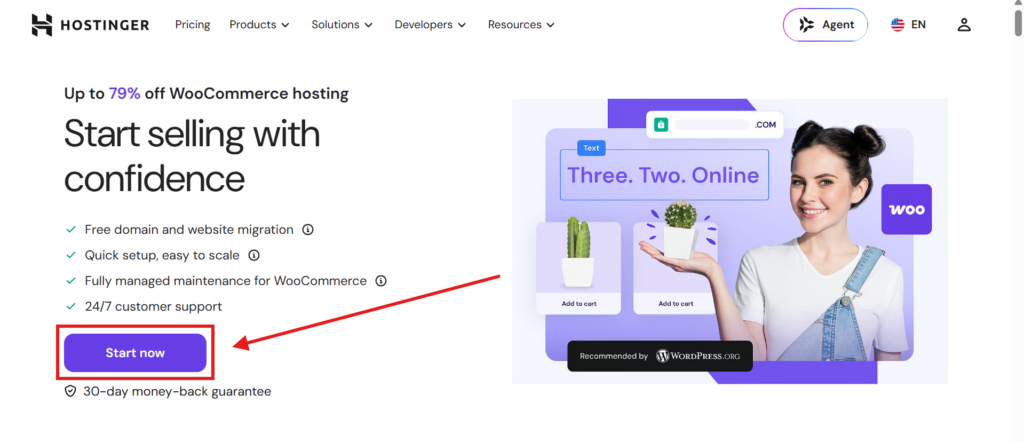
- Step 1: Visit the Hostinger WooCommerce Hosting Page
- First, navigate to Hostinger’s official WooCommerce hosting landing page. Here, you will see their current promotional offers, including massive discounts of up to 79% off.
- Click the Start now button to jump directly to the available subscription plans.
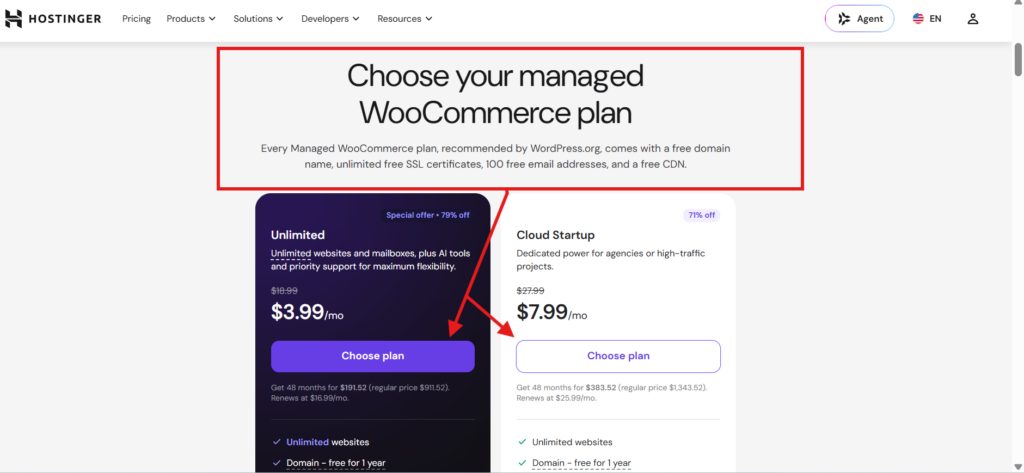
Step 2: Choose Your Managed WooCommerce Plan
- Unlimited Plan: Ideal for standard online stores, offering AI tools and priority support.
- Cloud Startup: Built for agencies or high-traffic e-commerce operations.
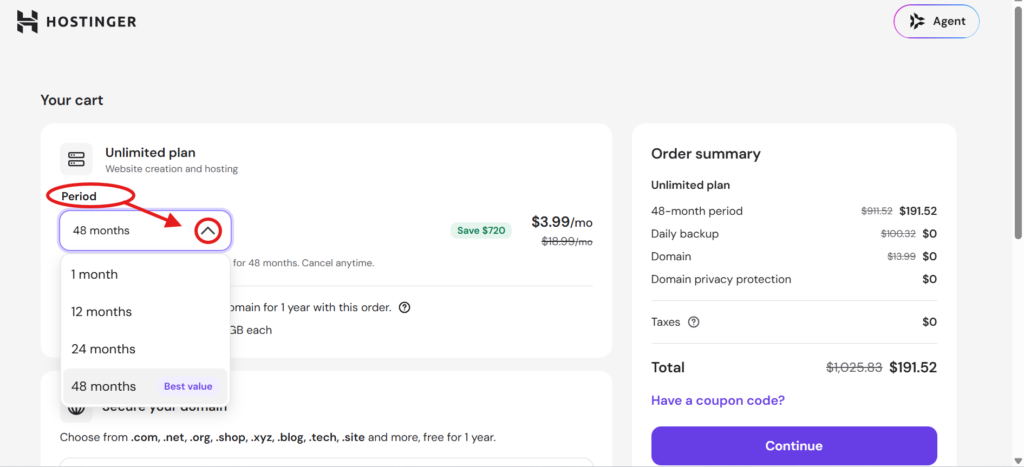
Step 3: Select Your Hosting Period
Step 4: Apply Your Promo Coupon Code
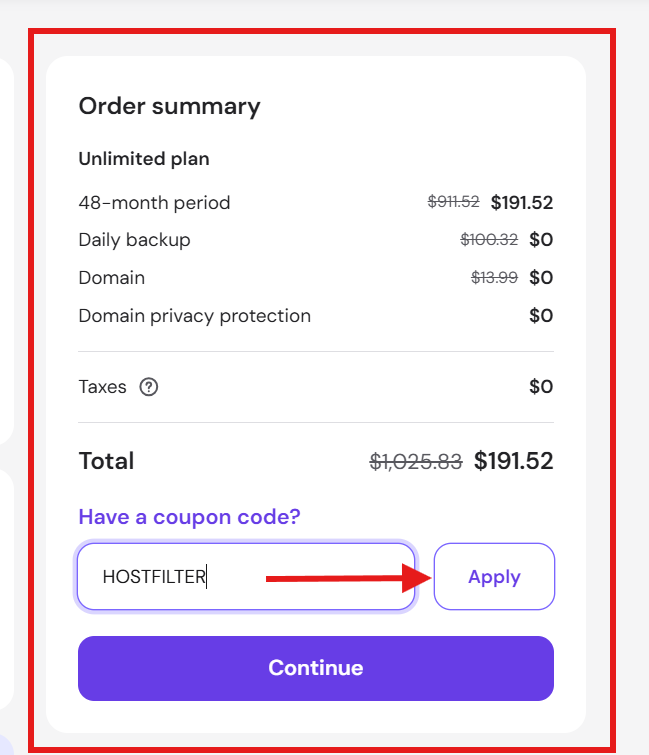
Step 5: Verify Your Discounted Total
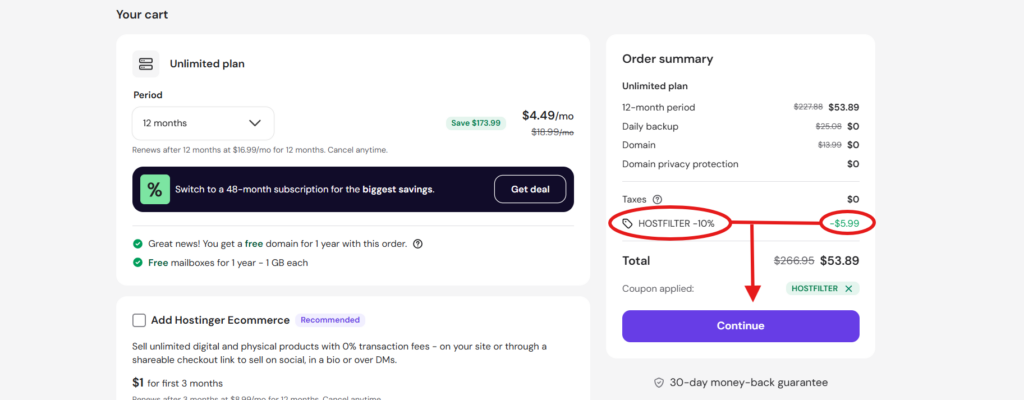
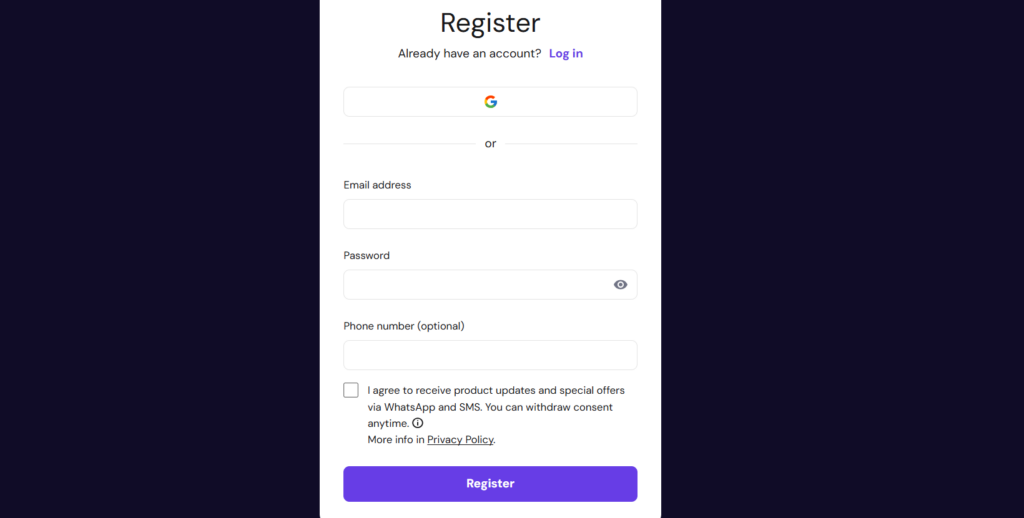
Step 6: Register Your Account and Complete Payment
- Enter a valid Email address.
- Create a secure Password.
- Add your phone number (optional).
- Accept the Terms of Service.
What to Do If Your Hostinger WooCommerce Hosting Promo Code Doesn’t Work
Having trouble applying your Hostinger WooCommerce Hosting coupon? Before giving up on the discount, try these troubleshooting steps to identify and resolve the issue.
- Recheck the Coupon Code: Enter your promo code carefully and make sure there are no spelling mistakes, extra spaces, or incorrect characters. Copying and pasting the code can help prevent typing errors.
- Check Whether the Offer Is Still Active: Some Hostinger coupon codes are available for a limited period. Review the offer details to confirm that the promotion hasn’t expired.
- Confirm Your Hosting Plan Qualifies: Certain discounts apply only to specific hosting packages. Make sure your selected WooCommerce Hosting plan meets the coupon’s eligibility conditions.
- Review the Purchase Requirements: Check whether the promotion has any minimum spending, subscription duration, or other qualifying conditions that your order must meet.
- Try a Different Browser: If the discount still doesn’t appear, clear your browser cache, open a private browsing window, or try another browser to rule out temporary technical issues.
- Ask Hostinger Support for Help: If none of these steps resolves the problem, contact Hostinger’s support team. They can help you understand why the coupon isn’t being accepted and check the available options.
Can You Apply Multiple Coupon Codes to One Hostinger Order?
Hostinger promotions generally have specific redemption rules, and multiple coupon codes may not be combinable in a single transaction. To get the most value from your WooCommerce Hosting purchase, compare the available offers before checking out and select the one that provides the greatest eligible savings.
For example, a percentage-based discount may save more on a higher-priced subscription, while a fixed-amount coupon could be more attractive for a smaller purchase. Always review the current terms and final checkout price to determine which deal works best for your order.
Does Hostinger Provide Discounts for Existing Customers?
Yes, existing Hostinger customers may also find promotional offers, renewal deals, or discounts on eligible services. However, availability can vary depending on the product, account, and promotion.
Here are a few ways to look for potential savings:
- Check Your Email: Keep an eye on messages from Hostinger for announcements about special offers and account-specific promotions.
- Sign In to Your Account: Review your Hostinger dashboard for any available deals or offers related to your services.
- Explore Current Promotions: Visit Hostinger’s official website to check whether any active discounts apply to your next hosting purchase.
- Compare Renewal and Upgrade Options: If you already have a hosting plan, review the applicable renewal or upgrade pricing before making a decision.
Remember that promotional discounts may be restricted to new purchases or particular subscription terms, so check the conditions before applying a code.
More Hostinger Coupons and Deals to Explore
Looking for additional ways to save on hosting and other online services? Explore these Hostinger coupon categories to find offers that may suit your website or business needs.
- Hostinger Business Hosting Coupons
- Hostinger WordPress Hosting Coupons
- Hostinger Black Friday and Cyber Monday Deals
- Hostinger Domain Coupon Codes
Hostinger: A Quick Overview
Founded in 2004, Hostinger has grown into a well-known web hosting provider offering services for individuals, developers, entrepreneurs, and businesses. Its product range includes shared web hosting, WordPress hosting, WooCommerce hosting, VPS solutions, and domain registration.
For online store owners, WooCommerce Hosting can provide a platform for launching and managing a WordPress-based ecommerce website. The most suitable plan depends on your store’s traffic, resource requirements, and expected growth.
Hostinger also provides customer support and website management tools to help users maintain their online presence. Before choosing a plan, compare its included features, security options, backup provisions, pricing, and applicable uptime terms to ensure it meets your requirements.

Frequently Asked Questions
Hostinger WooCommerce Hosting provides tools to help you build and manage an online store efficiently. Depending on your chosen plan, you may get SSD storage, a convenient control panel, WordPress and WooCommerce installation options, SSL certificates, backup features, and security tools. These features can help improve website reliability, protect customer data, and deliver a smoother shopping experience. Before purchasing, review the plan details to confirm which resources and features are included.
Yes, Hostinger offers hosting plans with different resource limits, allowing store owners to upgrade as their business develops. If your WooCommerce website attracts more visitors, adds products, or processes more orders, moving to a plan with additional resources may help accommodate the increased workload. Choosing the right package for your current needs and monitoring your store’s performance can help you prepare for future growth.
Hostinger WooCommerce Hosting can be a practical option for beginners who want to launch an online store without dealing with complicated server management. Its hosting dashboard, WordPress setup options, and available tutorials can make it easier to get started. You can use WooCommerce to manage products, payments, and orders while building your storefront around your business needs. Beginners should also review the available support resources and plan features before choosing a hosting package.
