
Bluehost Cloud Hosting Coupons and Promo Codes November 2026
Save more on reliable hosting with the latest Bluehost Cloud Hosting coupons and promo codes. Enjoy exclusive discounts on cloud hosting plans designed for speed, performance, and scalability. Whether you’re launching a blog, business website, or online store, Bluehost offers powerful hosting solutions to support your growth. Apply a valid promo code at checkout to reduce your hosting costs and get started with dependable cloud hosting at an affordable price.

25% OFF
59% OFF
33% OFF
68% OFF
OpenClaw VPS
Hermes Agent
Docker VPS
n8n Automation
GatorClaw



| Description | Discount | Coupon Code |
|---|---|---|
| Save Up to 68% on Web Hosting + Extra 10% Off and Free Domain | 68% OFF | SAVE10BH |
| Save Up to 68% on Managed WordPress Hosting + Extra 10% Off and Free Domain | 68% OFF | SAVE10BH |
| Save Up to 59% on VPS Hosting + Extra 10% Off Yearly Plans | 59% OFF | SAVE10BH |
| Save Up to 59% on OpenClaw VPS Hosting + Extra 10% Off Yearly Plans | 59% OFF | SAVE10BH |
| Save Up to 59% on GatorClaw Hosting + Extra 10% Off Yearly Plans | 59% OFF | SAVE10BH |
| Save 59% on Bluehost AI Agent Hosting + Extra 10% Off Yearly Plans | 59% OFF | SAVE10BH |
How to Apply and Activate Bluehost Cloud Hosting Coupon Codes
Redeeming a Bluehost Cloud Hosting coupon code is quick and easy. Browse the available offers on this page and select Copy Code or Show Deal to unlock your savings. When you choose Copy Code, copy the promo code and enter it in the designated field during checkout. For Show Deal offers, the discount is applied automatically when you visit the official Bluehost website through the provided link.
To get started, visit Bluehost, choose a cloud hosting plan that fits your needs, and proceed to checkout. Apply your eligible coupon code if required, then review the final price to confirm your savings before completing your purchase.
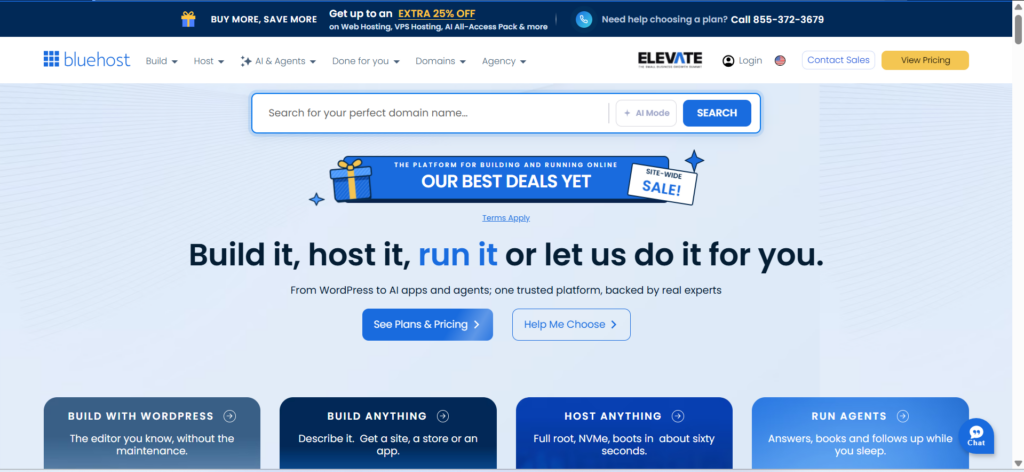
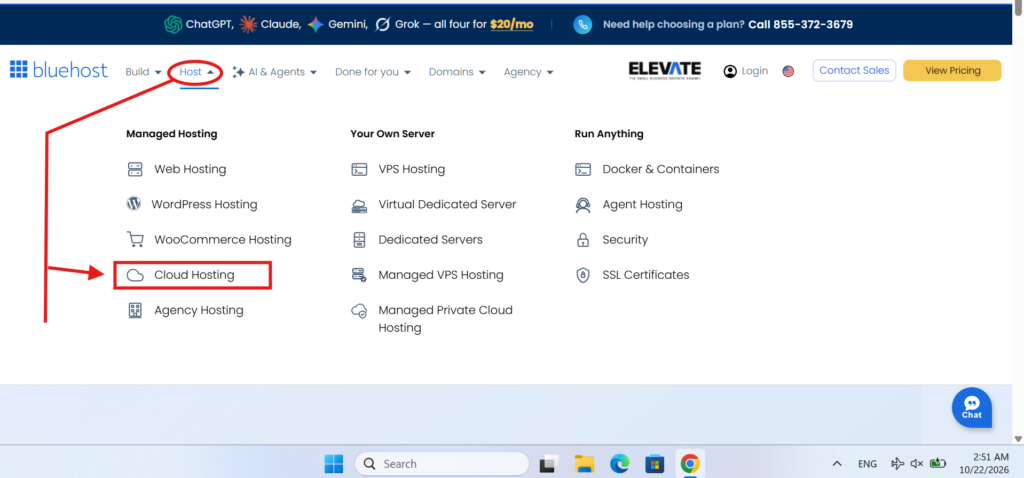
Next, visit the Bluehost website and click the Host tab in the top navigation menu. Then, select Cloud Hosting from the available options to explore the plans and choose the right hosting solution for your website.
On the next page, Bluehost presents its Cloud Hosting plans side by side, making it easy to compare pricing, website limits, storage, and performance features. Explore the available options to find the right fit for your needs. Cloud 10 supports up to 10 websites, while Cloud 25 accommodates up to 25 websites with additional resources. For larger projects or agency websites, Cloud 50 offers greater capacity and performance. Need a more customized setup? Choose Custom Cloud to discuss a solution tailored to your specific hosting requirements.
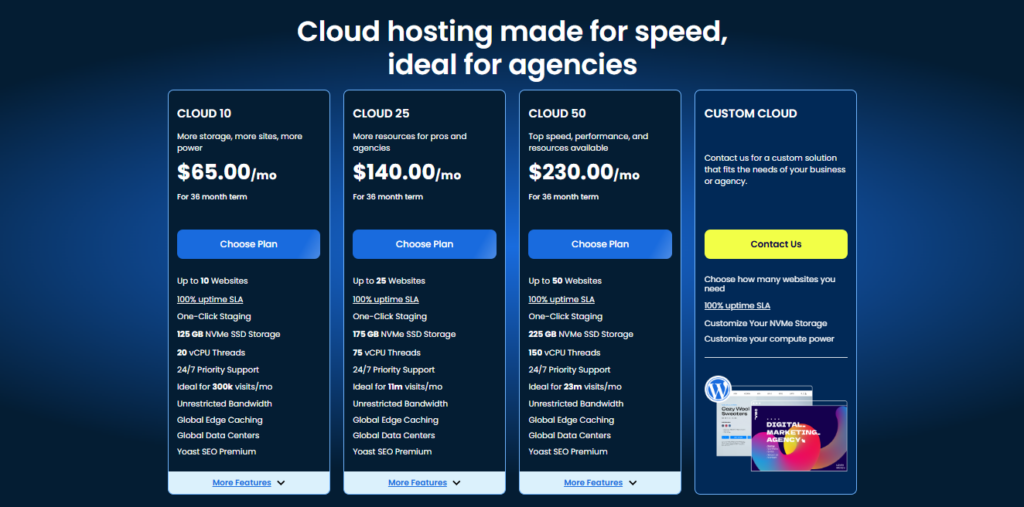
After comparing the available plans, click Choose Plan under the package that best suits your needs. If you prefer Custom Cloud, select Contact Us to discuss your requirements with Bluehost’s sales team and explore a personalized hosting solution.
Next, review the Location, Hardware, and Software sections to configure your server. For example, you might select a server located in Virginia, USA, with 2 vCPUs, 4 GB DDR5 RAM, 100 GB NVMe storage, and OpenClaw pre-installed. Available configurations may vary depending on the plan and options selected.
You can also check the Support & Security and Advanced Options sections to add extra features if needed. Review the server configuration and pricing summary displayed on the right. Once everything looks correct, click Continue to Checkout to proceed.
On the checkout page, create a Bluehost account using your email address, or sign in with Google, Apple, or GitHub if these options are available. Existing customers can sign in to their accounts to continue.
Finally, enter your billing information and select an available payment method. Depending on your location and checkout options, supported methods may include credit or debit cards, Google Pay, and PayPal. Complete the required fields, including your name, billing address, and contact details, and review your order before proceeding to payment.
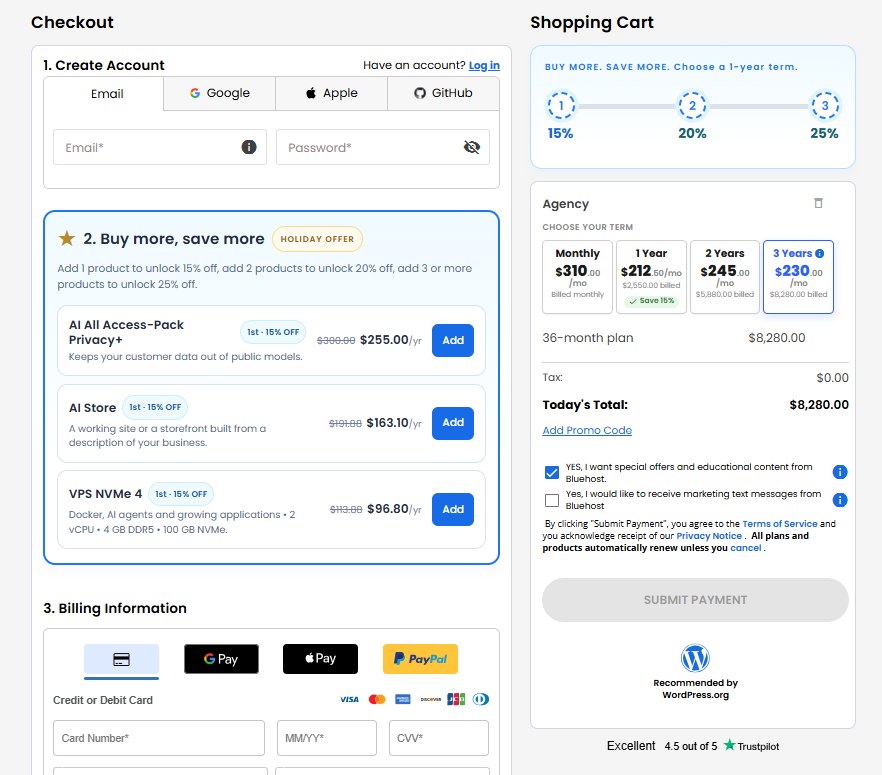
On the right side of the checkout page, review your shopping cart to verify the selected Cloud Hosting plan, billing term, and total price. If you have a Bluehost Cloud Hosting coupon code, click Add Promo Code, paste your code into the designated field, and apply it. Make sure the discount is reflected in your order total before proceeding.
Once you have confirmed that your hosting plan, applied discount, and final price are correct, click Submit Payment to complete your purchase and get started with your Bluehost Cloud Hosting plan.
What to Do If Your Bluehost Cloud Hosting Coupon Doesn’t Work
If your Bluehost Cloud Hosting promo code isn’t working, try these troubleshooting steps to resolve the issue and secure your discount.
- Check for Typing Errors: Enter the coupon code exactly as displayed, including any letters or numbers.
- Verify the Expiration Date: Some promotional offers have limited validity and may have expired.
- Review Plan Eligibility: Confirm that the coupon applies to your selected Cloud Hosting plan and isn’t restricted to another hosting service.
- Check New Customer Restrictions: Certain discounts may be available only to new Bluehost customers.
- Try a Different Browser: Clear your browser cache or switch browsers if technical issues prevent the code from applying.
- Contact Customer Support: Reach out to Bluehost support to confirm the coupon’s validity and eligibility for your chosen plan.
Can I Use More Than One Coupon Code at Bluehost?
Bluehost generally allows only one promo code per order, although the terms of individual promotions may vary. If you have multiple coupon codes, compare their benefits and choose the one that offers the best overall savings. Some plans already include promotional pricing, so always review the final checkout total before completing your purchase.
Does Bluehost Offer Discounts for Existing Customers?
Yes, existing Bluehost customers may find special offers on eligible hosting services, upgrades, or renewals. Available discounts depend on current promotions and account eligibility. Existing users can check their account dashboard and Bluehost’s promotional offers for opportunities to save on additional services or plan upgrades.
Bluehost Cloud Hosting Annual and Seasonal Discounts
Bluehost may offer special promotions and reduced pricing on eligible hosting plans throughout the year. Here are some opportunities to watch for:
- New Year Deals: Check for limited-time offers on eligible hosting subscriptions at the beginning of the year.
- Anniversary Sales: Look for occasional promotional campaigns on selected Bluehost services.
- Holiday Promotions: Explore special discounts that may become available during holidays and other shopping events.
- Annual and Multi-Year Plans: Compare longer billing terms, which may offer lower effective monthly costs than monthly subscriptions.
Note: Discounts, availability, and eligibility vary by promotion. Check the current offer terms before purchasing.
Bluehost Cloud Hosting: A Quick Overview
Bluehost Cloud Hosting provides a managed hosting solution designed to deliver performance, scalability, and reliability for growing websites. Depending on the selected plan, features may include CDN integration, security tools, resource management, and a user-friendly control panel. It can be a suitable option for business websites, agencies, blogs experiencing increased traffic, and website owners who want cloud hosting without managing every aspect of server infrastructure. Before choosing a plan, compare its resources, included features, and pricing to ensure it meets your website’s requirements.

Frequently Asked Questions
Yes, Bluehost offers promotional deals on eligible Cloud Hosting plans. Depending on the offer, you may receive an automatic discount or need to enter a promo code during checkout. Always check the coupon terms to confirm that it applies to your selected plan.
Some Bluehost coupons are limited to new customers, while other promotions may be available to existing users. Check for eligible upgrade offers, renewal discounts, or deals on additional hosting services before making a purchase.
Some Bluehost hosting promotions include a free domain registration for the first year. However, this benefit depends on the selected plan and the terms of the current offer. Review the included features before completing your order.
Yes, Bluehost offers hosting promotions at different times throughout the year. Discounts may appear during seasonal campaigns, holiday promotions, and special sales events. The savings and eligible plans vary, so check this page regularly for available offers.
Yes, you can explore upgrading your Bluehost Cloud Hosting plan as your website grows. Moving to a higher-tier plan may provide additional resources and capacity to accommodate increased traffic or changing business needs. Before upgrading, review the available options, pricing, and migration requirements to ensure the new plan meets your expectations.
- Bluehost Google Workspace Coupons & Promo Codes
- Bluehost AI Receptionist Coupons & Promo Codes
- Bluehost AI Website Builder Coupons & Promo Codes
- Bluehost Claude Code VPS Coupons & Promo Codes
- Bluehost Agent Hosting Coupons & Promo Codes
- Bluehost Cloud Hosting Coupons & Promo Codes
- Bluehost n8n Hosting Coupons & Promo Codes
- Bluehost OpenClaw Coupons & Promo Codes
- Bluehost Email Coupons & Promo Codes
- Bluehost India Coupons & Promo Codes
- Bluehost Domain Coupons & Promo Codes
- Bluehost Node.js Hosting Coupons & Promo Codes
- Bluehost Student Discount Coupons & Promo Codes
- Bluehost Christmas Coupons & Promo Codes
- Bluehost Blog Hosting Coupons & Promo Codes
- Bluehost AI All-Access Coupons & Promo Codes
- Bluehost WordPress Hosting Coupons & Promo Codes
- Bluehost Renewal Coupons & Promo Codes
- Bluehost VPS Coupons & Promo Codes
- Bluehost Black Friday Coupons & Promo Codes