
Bluehost Agent Hosting Coupons and Promo Codes November 2026
Save on AI hosting with the latest Bluehost Agent Hosting coupons and promo codes. Explore exclusive deals and special discounts on hosting plans designed for AI agents, automation tools, and intelligent workflows. HostFilter helps you discover available Bluehost promotions so you can find offers that fit your budget. Compare current deals, check coupon requirements, and apply an eligible promo code at checkout to reduce your hosting costs and get more value from your Bluehost Agent Hosting subscription.

25%OFF
59%OFF
15%OFF
59% OFF VPS
OpenClaw VPS
Hermes Agent
n8n Automation
Claude Code
59% OFF
GatorClaw 59%off
AI Receptionist



How to Apply and Activate Bluehost Agent Hosting Coupon Codes
Getting a discount on Bluehost Agent Hosting is easy when you choose the right promotional offer. If you see a Copy Code button, click it to copy the coupon and save it for checkout. For a Show Deal offer, click the button to visit Bluehost through the promotional link, where the discount may be applied automatically.
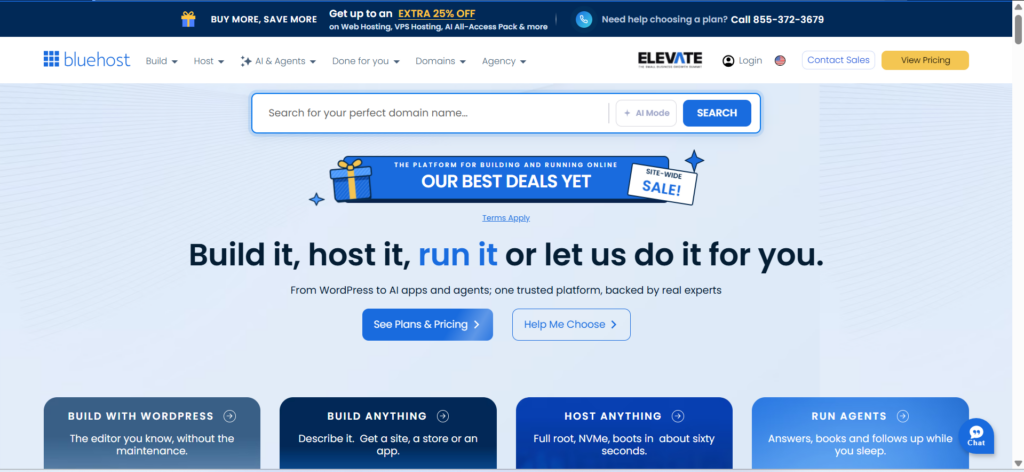
To get started, visit the official Bluehost website and explore the available Agent Hosting options. Choose a suitable plan, proceed to checkout, and enter your coupon code if required. Before completing your purchase, review the order summary to confirm that the discount has been applied successfully.
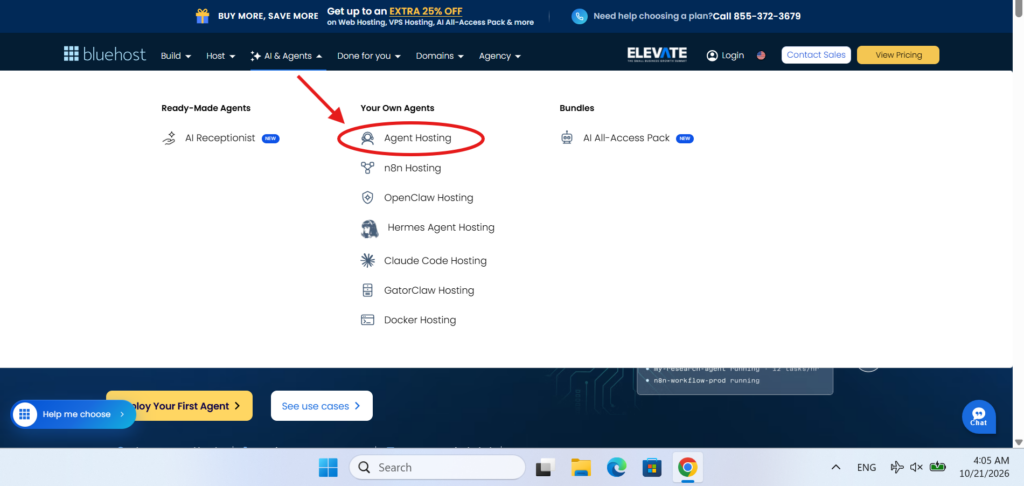
Once you’re on the official Bluehost website, open the AI & Agents section from the top navigation menu. Select Agent Hosting from the available options to access the hosting page, where you can explore the plans, compare features, and find a package that matches your project requirements.
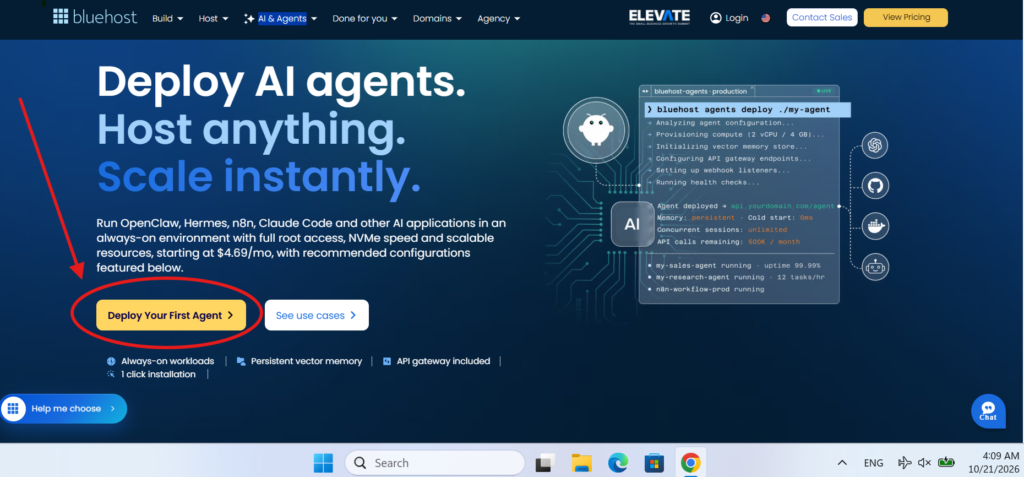
To get started, click the Deploy Your Agent button shown in the screenshot. Bluehost will take you to the Agent Hosting page, where you can explore the available AI agent options and choose the solution that best fits your project requirements.
On the Agent Hosting page, explore the available AI agent solutions and select the one that aligns with your project goals. If you need to automate repetitive tasks and connect different apps, n8n may be a suitable choice. For building AI assistants and running autonomous agent workflows, consider OpenClaw. GatorClaw may be worth exploring for eCommerce projects and demanding workloads. If your business needs a more customized setup or requires hosting for agency-level projects, choose the Custom option to discuss a tailored solution with Bluehost.
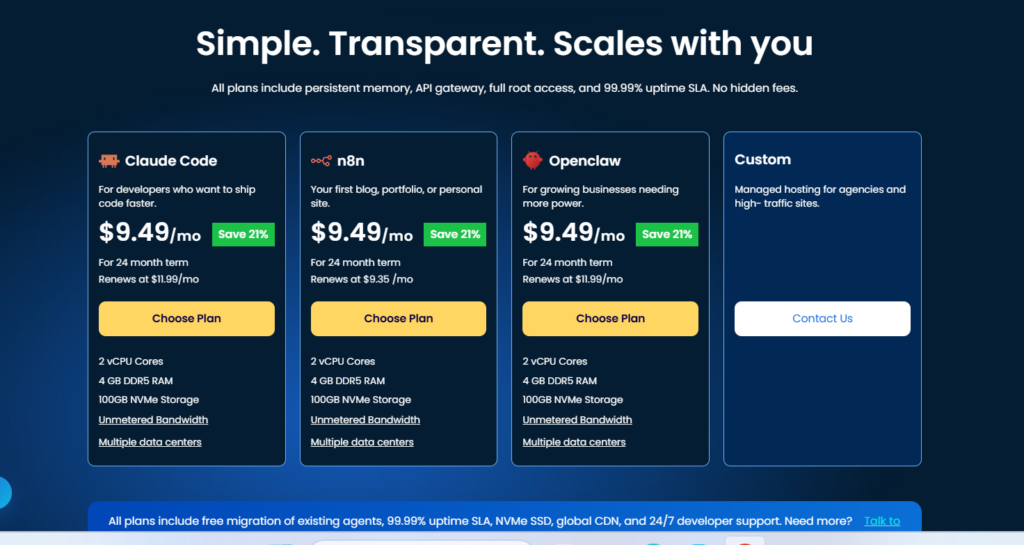
Each hosting card shows its starting monthly price, renewal cost, and included features, making it easier to compare the available plans. For this walkthrough, we’ll use OpenClaw, a suitable option for users running AI assistants and agent-based applications. Click Choose Plan beneath the OpenClaw card to move forward.
If you prefer a different platform, select Choose Plan under your desired agent instead. For specialized requirements, click Contact Us to discuss a custom hosting solution with Bluehost.
Once you continue, you’ll reach the server configuration page, where you can review your selected setup. The page initially displays the pre-configured OpenClaw NVMe 4 plan at the top. If you’d rather customize your server from scratch, click Start Fresh to explore the available configuration options.
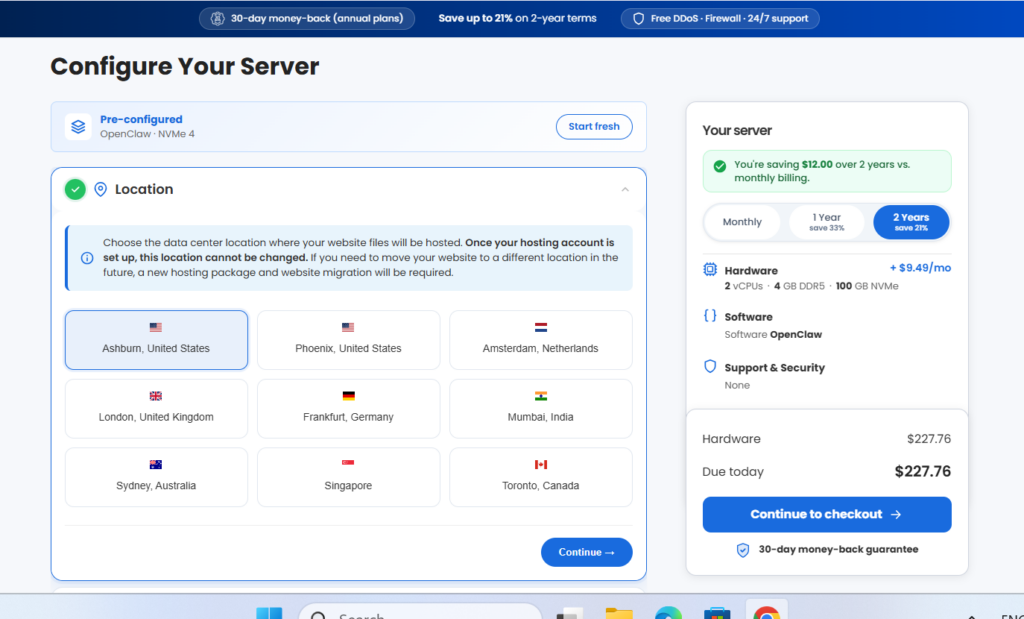
Review the Location, Hardware, and Software settings to confirm that your server is configured correctly. In this example, the selected server location is Virginia, USA, with 2 vCPUs, 4 GB DDR5 RAM, 100 GB NVMe storage, and OpenClaw pre-installed.
If you need additional protection or functionality, explore the optional Support & Security and Advanced Options sections. The configuration summary on the right displays your selected features and pricing, allowing you to review the costs before moving forward. Once everything looks right, click Continue to Checkout.
On the checkout page, create a Bluehost account using your email address if you’re a new customer. If you already have an account, you may be able to sign in using your existing credentials or an available option such as Google, Apple, or GitHub.
After signing in, enter your billing information and select an available payment method. Depending on the options shown at checkout, you may be able to pay using a credit or debit card, Google Pay, or PayPal. Make sure your name, billing address, and contact details are accurate before proceeding.
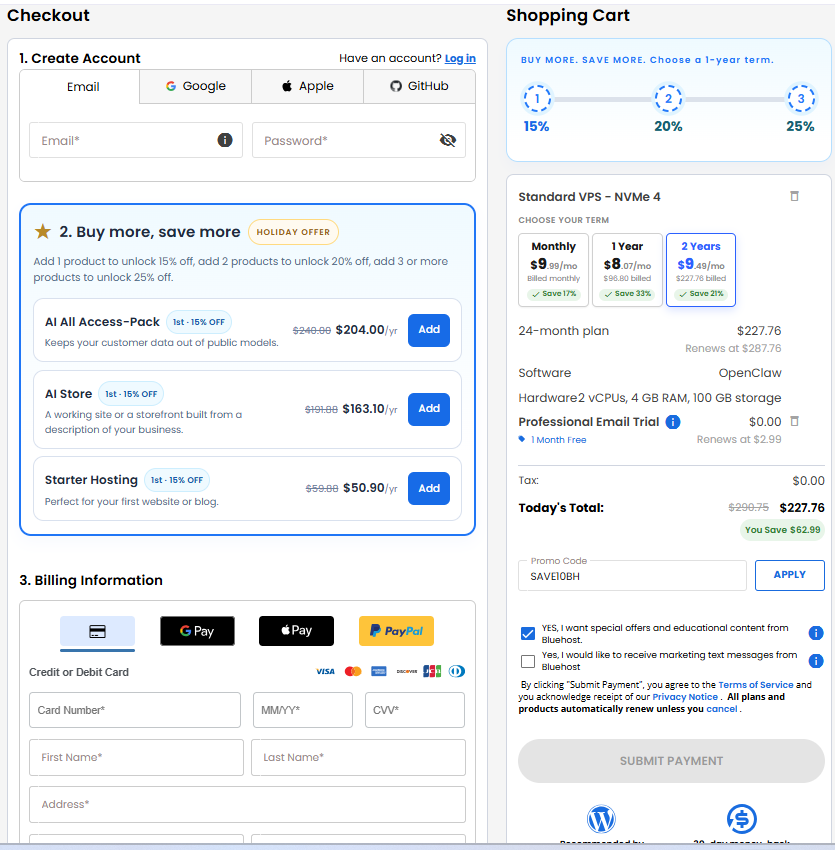
On the right-hand side of the checkout page, review your order summary to verify the selected agent hosting plan, billing period, and total cost. To redeem your Bluehost Agent Hosting coupon, click Add Promo Code and enter your copied code in the designated field. Apply the code and check that the updated price reflects your discount. Once you’ve confirmed the savings and reviewed the final order total, continue with checkout to complete your purchase.
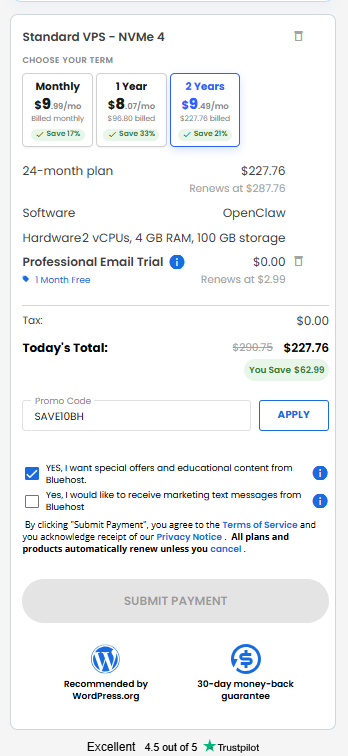
After reviewing your order details and confirming that the coupon discount has been applied, click Submit Payment to finalize your purchase. Once the payment is successfully processed, follow Bluehost’s instructions to access your newly purchased Agent Hosting plan and get your AI agent up and running.
How to Fix a Bluehost Agent Hosting Coupon That Won’t Apply?
If your Bluehost Agent Hosting coupon isn’t working, check the code for missing characters, extra spaces, or typing mistakes. You should also confirm that the promotion hasn’t expired and applies to your selected hosting plan and billing period. Some deals may have restrictions for new customers or particular subscriptions. If the discount still doesn’t appear, refresh the checkout page or try another browser. You can also contact Bluehost support to check the offer’s validity and resolve any checkout issues.
Can You Apply Multiple Bluehost Coupons to the Same Purchase?
Bluehost generally allows only one promotional code per order unless the offer terms state otherwise. If you have several Agent Hosting coupons, compare their discounts and choose the one that offers the most savings on your preferred plan. Also, review any existing promotional pricing included in the subscription, as it may already provide a lower starting cost.
What Discounts Can Existing Bluehost Customers Get?
Being an existing Bluehost customer doesn’t necessarily mean missing out on future savings. Depending on your account and current campaigns, you may find special pricing on upgrades, additional services, or selected hosting subscriptions. Check your account dashboard and look out for seasonal promotions to see whether any offers are available for your next purchase.
When Does Bluehost Offer Special Hosting Discounts?
Bluehost may introduce promotional pricing at different times throughout the year. If you’re planning to purchase Agent Hosting, comparing offers during major sales periods can help you find a suitable deal.
- Black Friday and Cyber Monday: Look for limited-time savings on eligible hosting packages and AI-related services.
- New Year promotions: Seasonal campaigns may feature discounts on selected annual subscriptions.
- Multi-year hosting deals: Longer subscription terms may offer a lower effective monthly price.
- Hosting bundle offers: Selected packages combining hosting with domains, email, or security products may provide additional value.
Promotions and eligibility requirements can change, so review the latest terms before purchasing. Compare the total subscription cost, included features, and renewal rates rather than relying on the advertised discount percentage alone.

Frequently Asked Questions
Not every Bluehost Agent Hosting coupon is valid for all subscription options. Some promotions may be limited to selected plans or exclude certain packages. Before choosing a deal, read its terms carefully and confirm that your preferred hosting plan qualifies for the advertised discount.
Yes, existing customers may find selected offers on upgrades or additional services, depending on their account and current promotions. However, many introductory coupons are designed for new subscribers. Check your Bluehost account and the conditions attached to each offer to see which discounts are available to you.
Most promotional codes apply to the initial subscription rather than future renewals. Once the introductory period ends, your plan may renew at the regular price. Check the billing details before purchasing so you understand both the initial cost and the expected renewal charges.
Refund eligibility depends on the hosting package and the applicable Bluehost terms. Some hosting plans offer a money-back guarantee, but the conditions, time limits, and exclusions may vary. Review the refund policy for your selected Agent Hosting plan before completing your order.
HostFilter is a place to check for Bluehost Agent Hosting coupons, promotional codes, and potential hosting discounts. You can also explore Bluehost’s official promotions and authorized partner offers. Before using a coupon, verify its validity, check any restrictions, and confirm that the discount appears in your checkout total.
- Bluehost Google Workspace Coupons & Promo Codes
- Bluehost AI Receptionist Coupons & Promo Codes
- Bluehost AI Website Builder Coupons & Promo Codes
- Bluehost Claude Code VPS Coupons & Promo Codes
- Bluehost Agent Hosting Coupons & Promo Codes
- Bluehost Cloud Hosting Coupons & Promo Codes
- Bluehost n8n Hosting Coupons & Promo Codes
- Bluehost OpenClaw Coupons & Promo Codes
- Bluehost Email Coupons & Promo Codes
- Bluehost India Coupons & Promo Codes
- Bluehost Domain Coupons & Promo Codes
- Bluehost Node.js Hosting Coupons & Promo Codes
- Bluehost Student Discount Coupons & Promo Codes
- Bluehost Christmas Coupons & Promo Codes
- Bluehost Blog Hosting Coupons & Promo Codes
- Bluehost AI All-Access Coupons & Promo Codes
- Bluehost WordPress Hosting Coupons & Promo Codes
- Bluehost Renewal Coupons & Promo Codes
- Bluehost VPS Coupons & Promo Codes
- Bluehost Black Friday Coupons & Promo Codes