
Bluehost Node.js Hosting Coupons and Promo Codes November 2026
Save on your development projects with the latest Bluehost Node.js Hosting Coupons and Promo Codes. Explore exclusive Bluehost hosting deals and discounts on VPS and dedicated server plans to run Node.js applications, APIs, and dynamic websites. Whether you’re a developer, startup, or business, these promo offers can help reduce your hosting costs while providing greater flexibility and control. Compare available Bluehost coupon codes, check eligibility, and choose the best hosting deal for your needs.

68% OFF
59% OFF
33% OFF
68% OFF
33% OFF
n8n Automation
Hermes Agent
OpenClaw VPS
GatorClaw
Docker VPS
AI Agent
Claude Code
25% OFF
| Description | Discount | Coupon Code |
|---|---|---|
| Save Up to 68% on Web Hosting Plans + Extra 10% Off and Free Domain | 68% OFF | SAVE10BH |
| Get Up to 68% Off Managed WordPress Hosting + Extra 10% Off and Free Domain | 68% OFF | SAVE10BH |
| Save Up to 59% on VPS Hosting + Extra 10% Off Yearly Plans | 59% OFF | SAVE10BH |
| Get Up to 59% Off Docker VPS Hosting Plans + Extra 10% Off Yearly Plans | 59% OFF | SAVE10BH |
| Save Up to 59% on Hermes Agent Hosting Plans + Extra 10% Off Yearly Plans | 59% OFF | SAVE10BH |
| Get Up to 59% Off n8n Automation Hosting Plans + Extra 10% Off Yearly Plans | 59% OFF | SAVE10BH |
How to Use and Activate Bluehost Node.js Hosting Coupon Codes Successfully
Visit the official Bluehost website and select a hosting plan suitable for your Node.js application. Proceed to checkout, enter your eligible coupon code in the promotional field, and apply it to activate the available discount. Before completing your purchase, confirm that the updated price and any included benefits appear in your order summary.
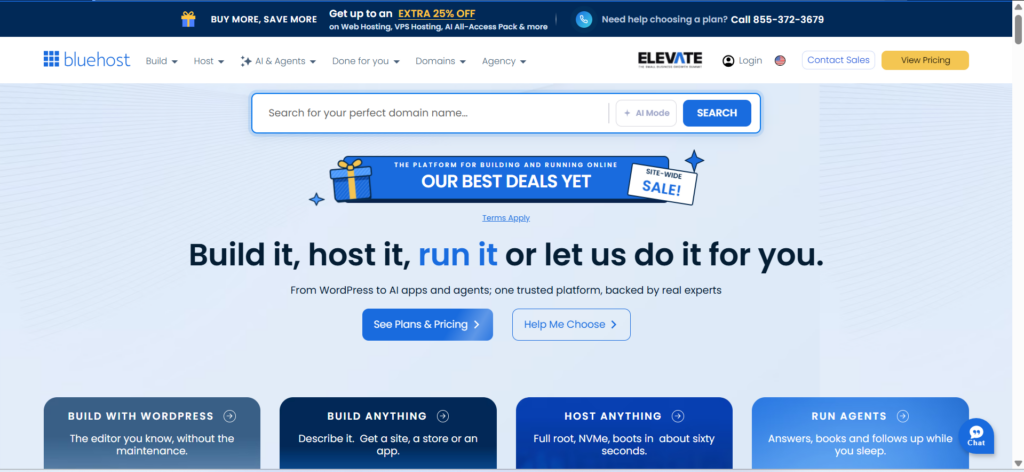
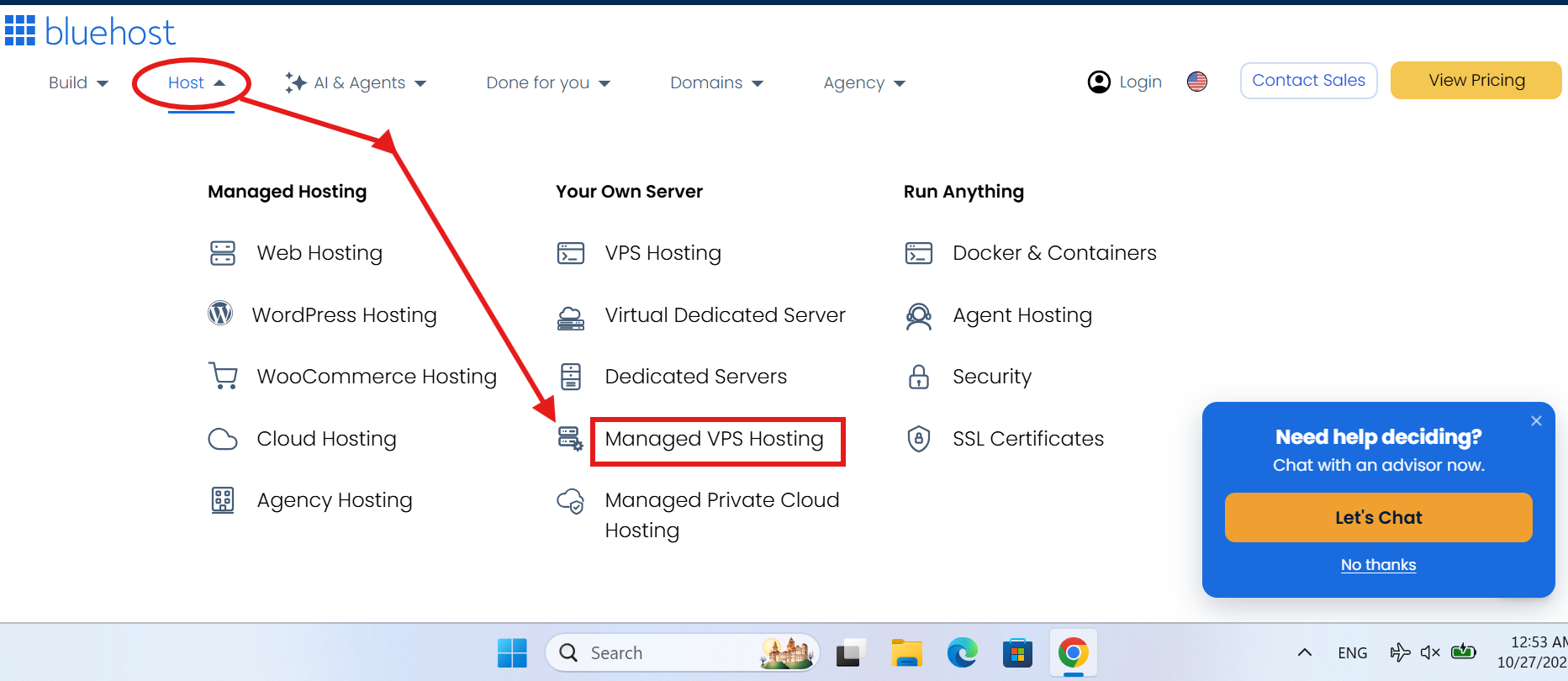
Open the official Bluehost website. From the top navigation menu, go to Host and select VPS Hosting or Dedicated Servers, depending on your project requirements. For managed server options, choose Managed VPS Hosting instead.
Review the available plans and select the one that matches your resource requirements. Follow the on-screen configuration and checkout steps to complete your purch
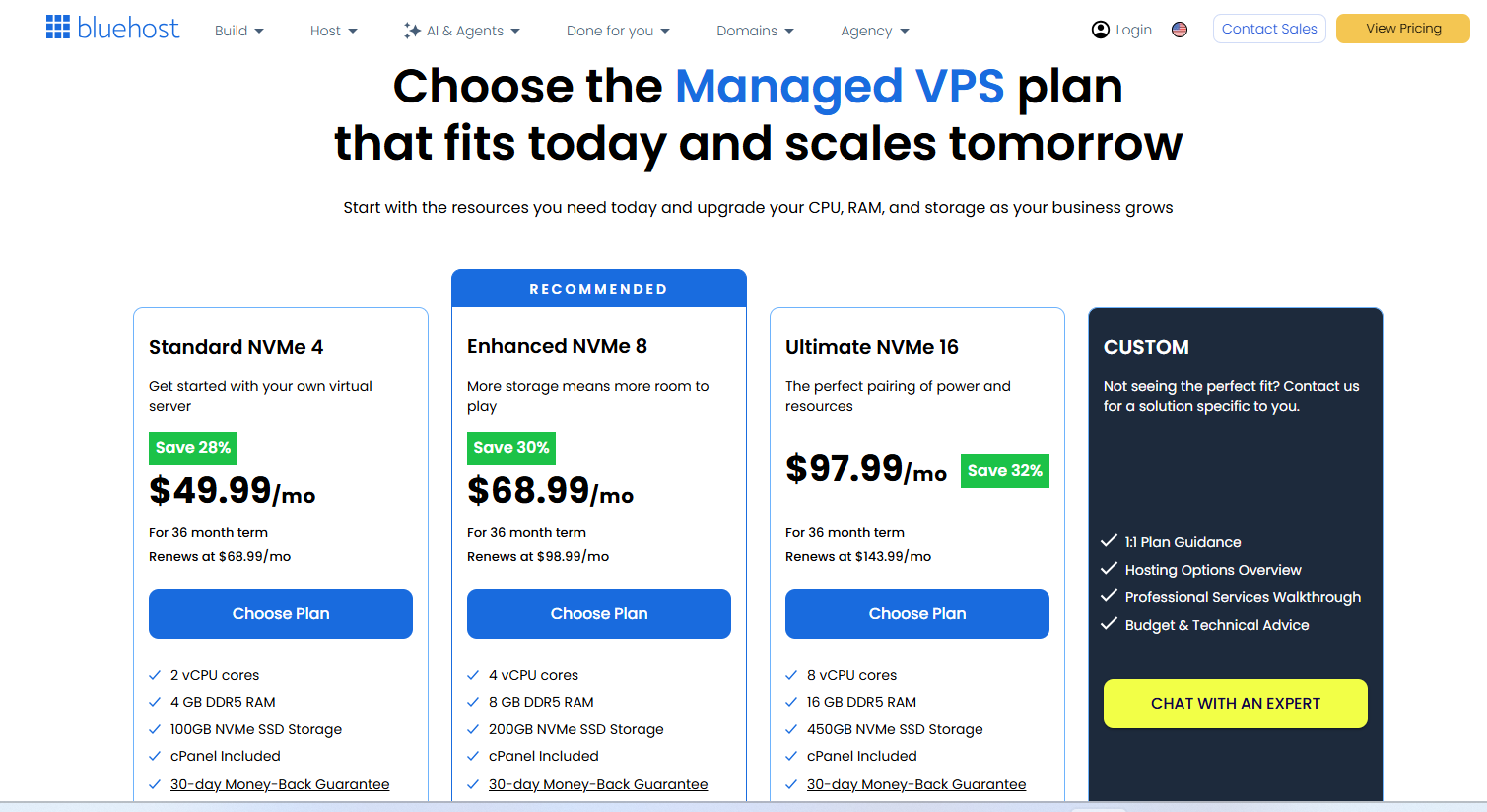
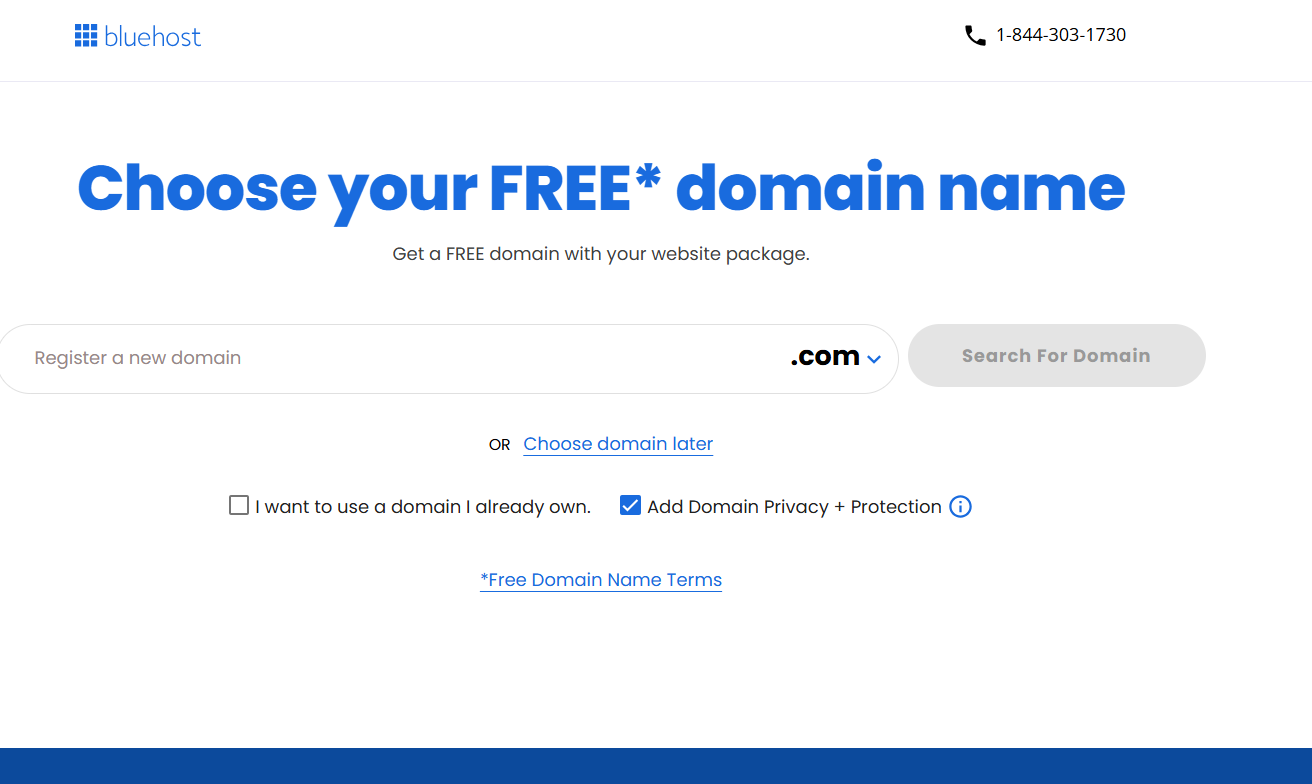
On the next screen, choose a domain name for your website by selecting Register a New Domain or Use a Domain You Already Own. If you haven’t decided on a domain yet, you can Skip This Step and return to it later if the checkout process allows.
Review your selected hosting plan and choose the available Billing Term, such as Monthly, Yearly, or Three-Year billing, depending on the options displayed. Next, review the optional Add-ons and select any extra features you need. Once everything looks right, proceed by clicking Continue to Checkout or the equivalent button shown on the page.
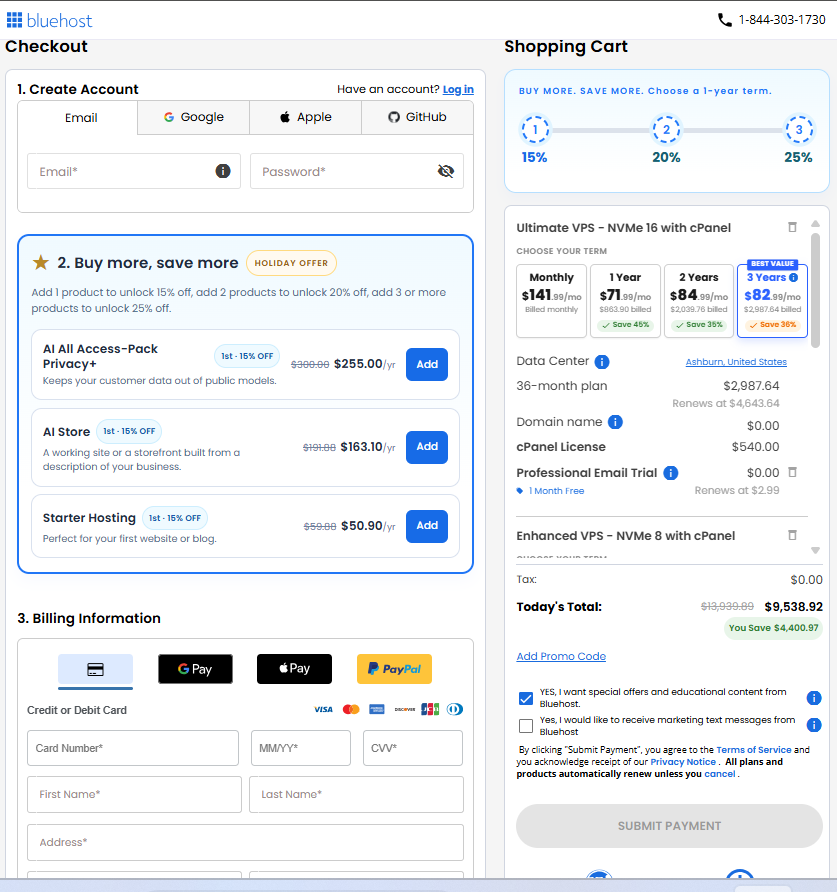
Next, enter your contact details, billing information, and payment method. You may need to log in or create a new account before checkout.
Find the Add Coupon Code option in the Today’s Total section. Click it, paste your coupon code, and hit Apply.
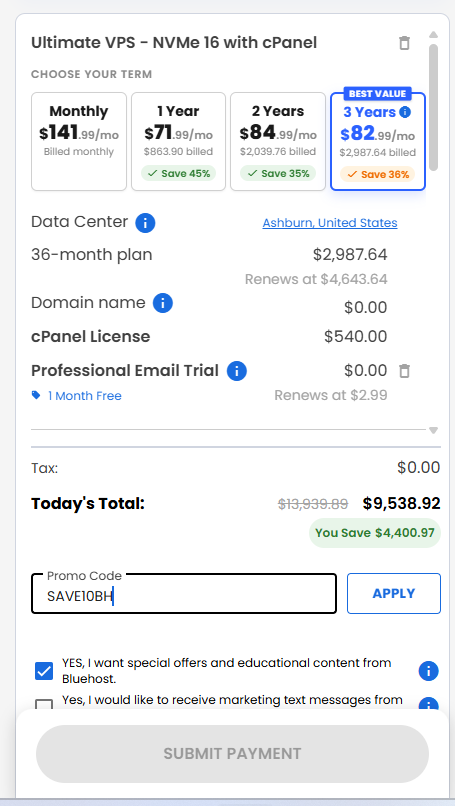
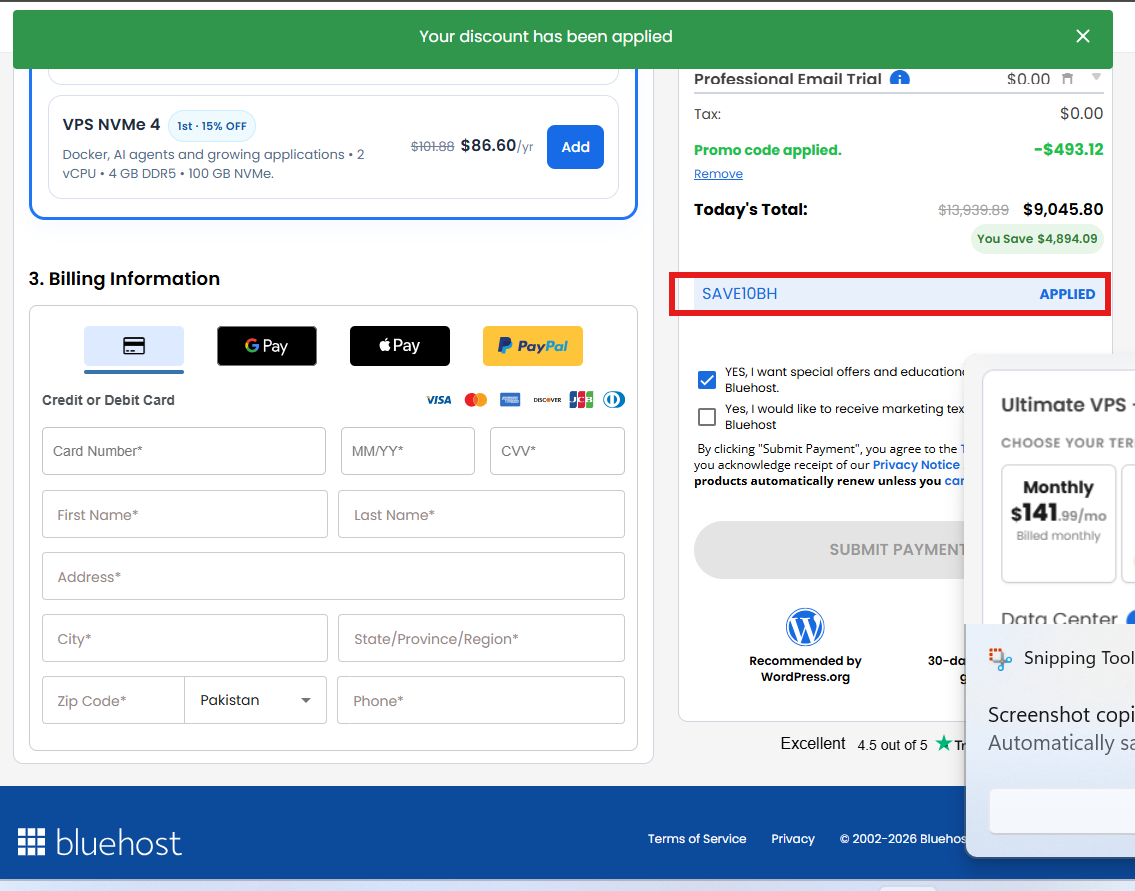
Before completing your purchase, review the order summary and confirm that your Coupon Discount has been applied to the total price. Once you’ve verified the updated amount and selected services, click Submit Payment or the equivalent checkout button to finalize your order.
What to Do If Your Bluehost Node.js Hosting Promo Code Fails
Got a Bluehost Node.js hosting coupon, but the discount isn’t showing up? Before checking out at full price, try a few quick fixes. Sometimes, the issue comes down to a small mistake or an offer that doesn’t match your order.
- Recheck the Promo Code: Make sure every letter and number is correct. Even an extra space can prevent the code from working.
- Check Whether It Has Expired: Some Bluehost deals are available for a limited period and may no longer be active.
- Match the Offer to Your Plan: Review the coupon conditions to see whether your chosen hosting package, billing term, and order type are eligible.
- Look at Your Checkout Total: If the offer requires a minimum purchase amount, ensure your order meets that threshold.
- Give Your Browser a Fresh Start: Clear your cache, open a private browsing window, or try another browser.
- Get Help From Bluehost: Still stuck? Contact the support team to find out why the discount isn’t applying.
Can You Use Multiple Bluehost Node.js Coupon Codes on One Order?
Want to combine two Bluehost coupons for extra savings? Generally, Bluehost promotional codes cannot be combined on the same order. Your best bet is to compare the available offers and apply the one that delivers the biggest eligible discount on your Node.js hosting plan. Always check the individual coupon terms before completing your purchase.
Bluehost Coupons for Existing Customers
Already hosting your website with Bluehost? You might notice that some promo codes are limited to new customers or first-time purchases. However, that doesn’t mean you should stop looking for ways to save.
Check your account dashboard for personalized promotions, watch for special hosting offers, and contact Bluehost support to ask about renewal deals or discounts available to existing customers. Availability varies, so confirm the terms before renewing your plan.
Bluehost Seasonal Promotions and Special Deals
If your Node.js project isn’t urgent, keeping an eye on seasonal promotions may help you find a better hosting deal. Bluehost discounts can vary throughout the year, so it’s worth comparing prices before committing to a plan.
- Holiday Offers: Look for potential discounts around Christmas, Halloween, Thanksgiving, and other major holidays.
- Summer and Winter Promotions: Seasonal campaigns may feature reduced prices on selected hosting packages.
Remember to check the promotion’s validity, eligible plans, and renewal pricing. A lower introductory price doesn’t necessarily mean the same discount will apply when your hosting plan renews.
Find the Best Bluehost Coupon for Your Hosting Needs
Need a different hosting deal? Explore these Bluehost coupon guides to find offers for your next project or upcoming renewal.
- Bluehost VPS Coupons & Promo Codes — Find potential savings on VPS plans for applications that need more resources and server control.
- Bluehost Renewal Promo Codes & Coupons — Explore discounts that may help lower your next hosting renewal cost.
- Bluehost WordPress Hosting Coupons & Promo Codes — Check out offers for WordPress blogs, business websites, and growing online brands.
- Bluehost Blog Hosting Coupons & Promo Codes — Discover hosting deals for bloggers, content creators, and personal website owners.
- Bluehost Christmas Promo Codes & Coupons — Browse seasonal coupon opportunities for eligible Bluehost hosting services during the Christmas period.
Bluehost: A Quick Overview
Bluehost provides hosting services for website owners, developers, bloggers, and businesses, with different plans suited to different technical needs.
For Node.js applications, VPS or dedicated hosting may offer the server access and configuration flexibility required to run your project. However, compatibility depends on the specific hosting plan, so check the available operating system, Node.js installation options, and server management features before signing up.
It’s also worth reviewing storage, memory, bandwidth terms, SSL coverage, and support availability to make sure the plan fits your application. Once you’ve found a suitable package, apply an eligible Bluehost promo code at checkout and verify that the discount appears in your final price before completing your order.

Frequently Asked Questions
Bluehost offers Node.js hosting through compatible VPS and dedicated server plans, giving developers greater control over their application environments. Depending on the plan, features may include SSL certificates, bandwidth allowances, and 24/7 customer support.
Bluehost promotional offers can change throughout the year, with special deals often appearing during seasonal sales and major shopping events. Check the official Bluehost website regularly to find current discounts and eligible hosting promotions.
To reduce your hosting costs, compare available billing terms, look for eligible coupon codes, and review any optional add-ons before checkout. Choose a longer subscription only if it suits your budget and project plans, and confirm the final renewal price before placing your order.
Yes, you can run Node.js applications on Bluehost using a hosting environment that supports your required Node.js version and server configuration. VPS or dedicated hosting may provide the control needed to configure your application, but verify the current technical requirements and supported features for your chosen plan before purchasing.
- Bluehost Google Workspace Coupons & Promo Codes
- Bluehost AI Receptionist Coupons & Promo Codes
- Bluehost AI Website Builder Coupons & Promo Codes
- Bluehost Claude Code VPS Coupons & Promo Codes
- Bluehost Agent Hosting Coupons & Promo Codes
- Bluehost Cloud Hosting Coupons & Promo Codes
- Bluehost n8n Hosting Coupons & Promo Codes
- Bluehost OpenClaw Coupons & Promo Codes
- Bluehost Email Coupons & Promo Codes
- Bluehost India Coupons & Promo Codes
- Bluehost Domain Coupons & Promo Codes
- Bluehost Node.js Hosting Coupons & Promo Codes
- Bluehost Student Discount Coupons & Promo Codes
- Bluehost Christmas Coupons & Promo Codes
- Bluehost Blog Hosting Coupons & Promo Codes
- Bluehost AI All-Access Coupons & Promo Codes
- Bluehost WordPress Hosting Coupons & Promo Codes
- Bluehost Renewal Coupons & Promo Codes
- Bluehost VPS Coupons & Promo Codes
- Bluehost Black Friday Coupons & Promo Codes