
Namecheap Reseller Hosting Coupons & Promo Codes October 2026
Namecheap reseller hosting coupons and promo codes can help you reduce the cost of launching and managing your hosting business. Explore available discounts, seasonal offers, and special promotions before choosing your reseller plan. Learn how to apply a coupon correctly during checkout and check its terms, expiration date, and eligibility requirements. With the right Namecheap reseller hosting deal, you can lower your initial expenses, access useful hosting resources, and get more value from your reseller hosting package.

10% OFF
70% OFF



| Coupon Title | Discount | Coupon Code |
|---|---|---|
| Up to 71% OFF on Web Hosting (Use Exclusive Code for an Extra 10% OFF) | 71% discount | HOSTADVICE10 |
| Up to 46% OFF WordPress Hosting | 44% OFF | Auto-Applied |
| Up to 37% OFF Annual VPS Hosting Plan | 37% off | Auto-Applied |
| Save up to 10% OFF Reseller Hosting plans | 10% OFF | Auto-Applied |
| Save up to 45% on 1st Year of Dedicated Server Hosting | 45% OFF | Auto-Applied |
| 55% OFF .COM Domains (Use Exclusive Code for an Extra 10% OFF) | .COM | HOSTADVICE10 |
| 31% OFF .DEV Domains (Use Exclusive Code for an Extra 10% OFF) | 31% OFF | HOSTADVICE10 |
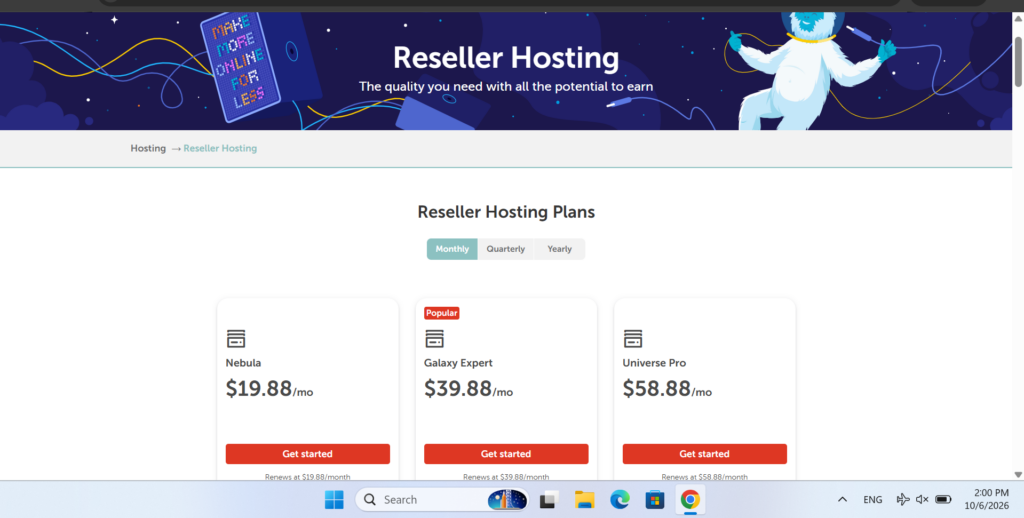
Visit Namecheap: Open the Namecheap website and head over to the Hosting → Reseller Hosting section.
Select Your Plan: Choose the reseller hosting package that matches your requirements, such as Nebula, Galaxy Expert, or Universe Pro.
Pick a Data Centre: Select your preferred data centre location from the available US or UK options.
Start the Signup: After making your selections, click “Get Started” to begin the registration process.
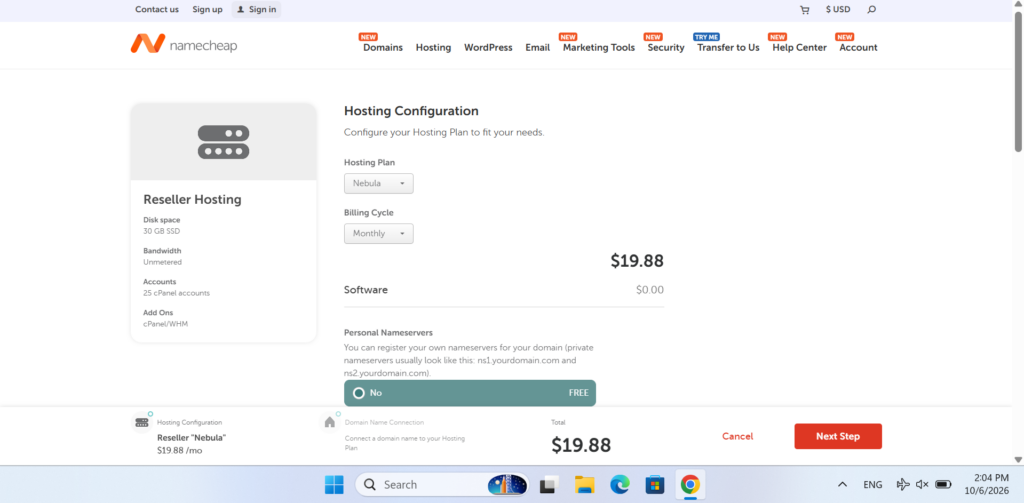
- Review Your Settings: Customise your reseller plan by selecting a billing cycle, configuring your nameservers, and choosing your preferred billing platform. Once everything is set, click “Next Step” to continue.
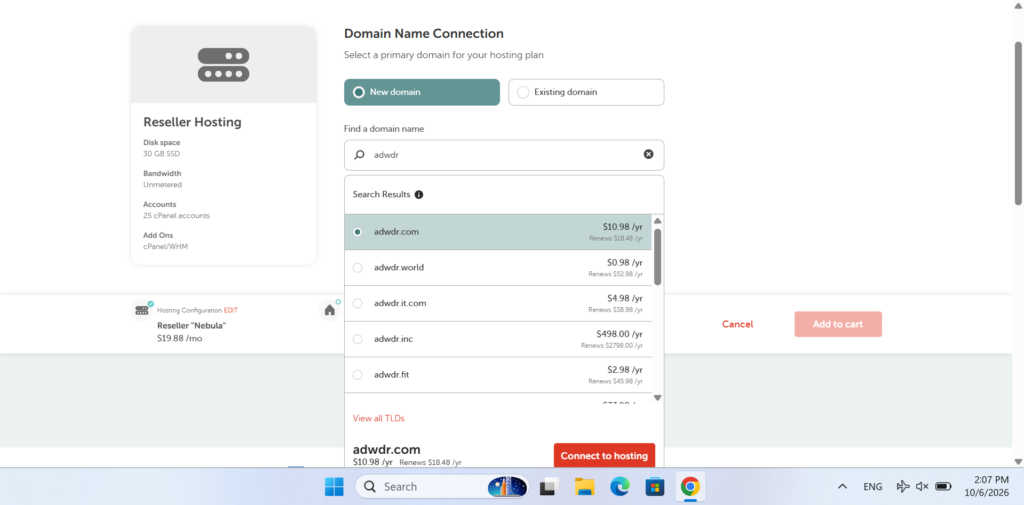
Connect Your Domain: Register a new domain or link an existing one to your reseller hosting plan. If you need a new domain, use the search bar to check its availability.
Add to Cart: Once you’ve selected your domain, click “Add to Cart” to move forward with your order.
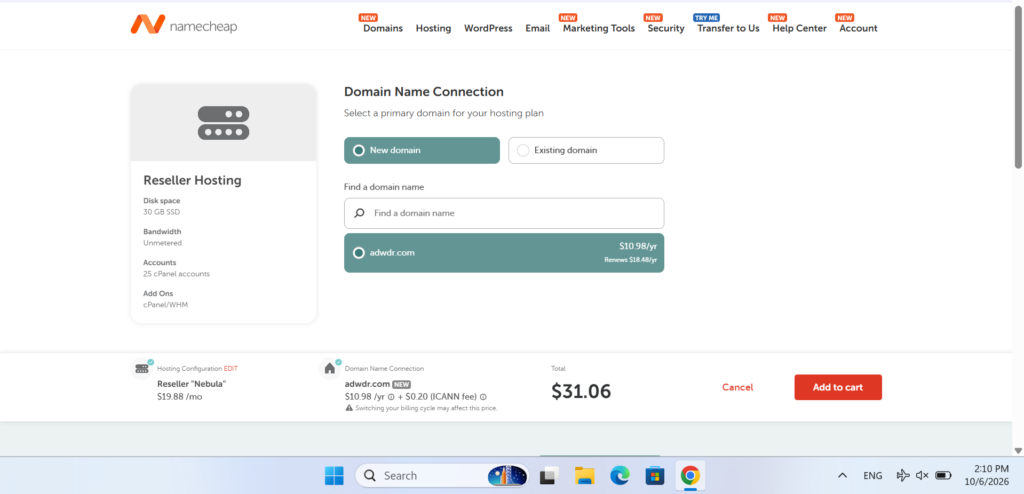
Check the Updated Price: Once your domain is linked to the plan, review the updated total price.
Add to Cart Again: If everything looks correct, click “Add to Cart” once more to continue.
Review Your Order: Check your reseller hosting plan details and available settings on the next page. Your complete order summary will appear on the left.
Enter the Coupon Code: Find the promo code box on the right, enter your Namecheap Reseller Hosting coupon code, and click “Apply” to activate the discount.
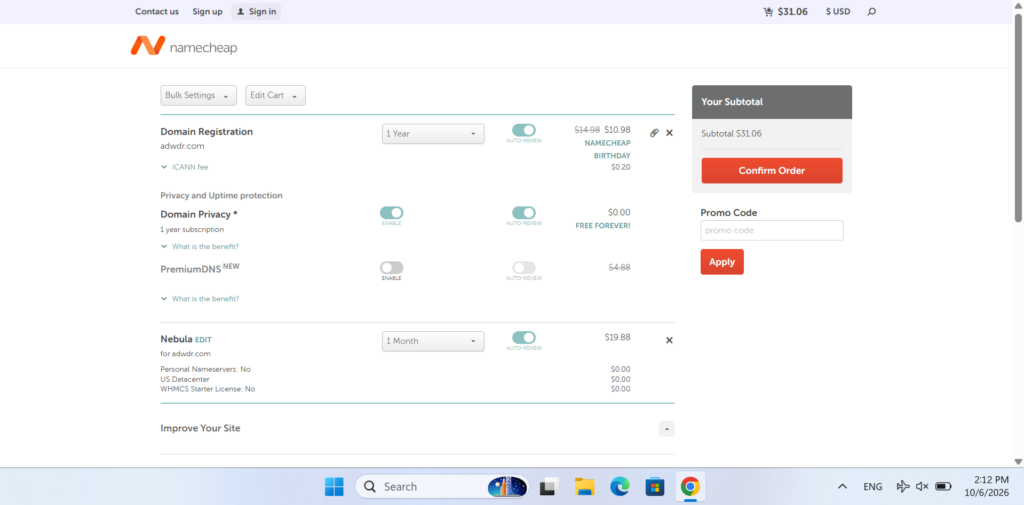
Add Extra Features: Scroll down to explore optional add-ons, such as domain privacy and SSL certificates, and select any extras you need.
Confirm Your Order: Once you’re happy with your selections, click “Confirm Order” at the bottom to continue.
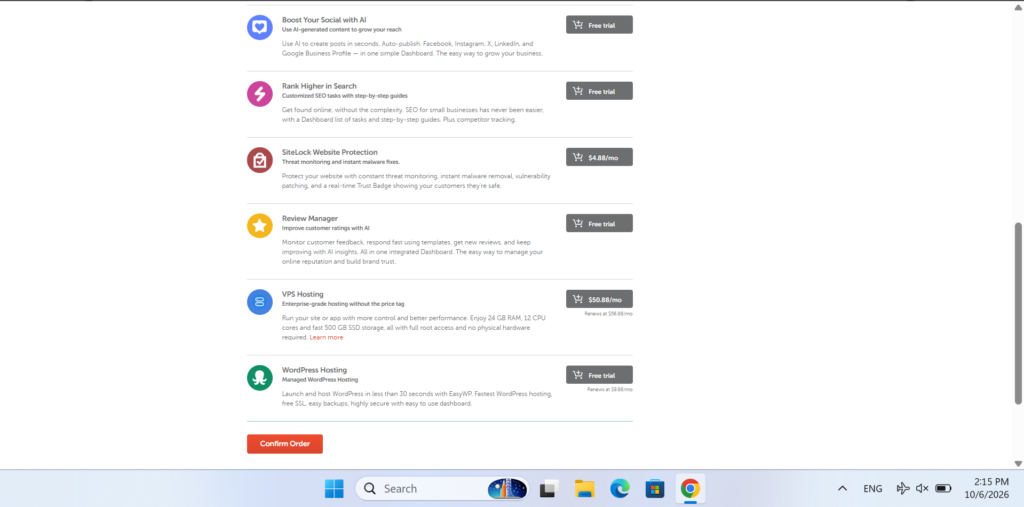
- Finalise payment: Finally, you’ll be asked to log in or create a new account, enter your information, and finish your payment.
What to Do if the Namecheap Reseller Hosting Promo Code Doesn’t Work
If your Namecheap reseller hosting promo code isn’t working, try these quick fixes:
Double-check the code for typos or extra spaces, then enter it again.
Make sure the coupon hasn’t expired. Some deals are only available for a limited time.
Confirm that the coupon is valid for the reseller hosting plan you selected.
Clear your browser cache or try using an incognito window.
If it still doesn’t work, switch to another browser and try again.
Check whether the coupon is limited to new purchases or specific billing cycles, such as annual plans.
If you’re still having trouble, contact Namecheap support for assistance.
Namecheap Coupon Rules and Eligibility
Namecheap allows only one coupon code per purchase, so multiple promo codes can’t be combined in the same order. To get the best possible deal, choose the coupon that offers the biggest saving for your reseller hosting plan and apply it during checkout.
Most discounts are aimed at new customers, but existing users can also find special offers during major sales events such as Black Friday and Cyber Monday. Promotions may also be available for renewals, upgrades, and add-ons. It’s worth checking Namecheap’s promo page regularly for the latest deals.
What Are the Essential Namecheap Reseller Hosting Features?
Namecheap Reseller Hosting includes useful features such as unmetered bandwidth, free cPanel accounts, and support for unlimited domains.
The plans also include 24/7 customer support and DDoS protection, making them suitable for growing reseller businesses. You can also get free domain registration for the first year.
How Much Does Namecheap Reseller Hosting Cost?
Namecheap Reseller Hosting plans start at $19.88 per month with the Nebula plan, which includes 30GB SSD storage and 25 cPanel accounts.
The Galaxy Expert plan costs $39.88 per month and comes with 90GB SSD storage and 100 cPanel accounts.
For users who need additional resources, the Universe Pro plan costs $58.88 per month and includes 150GB SSD storage and 150 cPanel accounts. Choosing annual billing can help you save more when applicable discounts are available.

Insights and Experiences from Namecheap Customers
Frequently Asked Questions
Yes, Namecheap reseller hosting plans include automated backup features. These backups can help protect your hosting data and client websites. If something goes wrong, you may be able to restore your website data through the available hosting tools.
Yes, the service is designed to make client management relatively straightforward. Resellers can create separate cPanel accounts for customers and use WHM to manage their hosting environment. You can also configure resources your business needs additional resources. Upgrading can provide more storage, bandwidth, and and hosting settings according to each client’s requirements.
Yes, you can move to a higher reseller hosting package when your business needs additional resources. Upgrading can provide more storage, bandwidth, and account capacity, allowing you to take on more customers without immediately moving to another hosting provider.
Namecheap reseller hosting can be useful for freelancers, web designers, developers, digital agencies, and entrepreneurs who manage websites for multiple customers. Instead of purchasing separate hosting for every client, you can manage several websites through one reseller account.
Yes, reseller hosting can be combined with other digital services such as website design, maintenance, SEO, and development. This allows freelancers and agencies to create complete packages for their clients and manage their websites and hosting from a single business setup.